Making OpenWrt running on an iBall router

I’ve been going down the homelab rabbit hole for the past few months, trying to self-host a file server, Pi-hole, and a bunch of other things. While doing this, I realized that having better control over the security of your home network is really important. Initially I only started off by trying to get rid of my ISPs locked down router, there's a informative discussion here. if you're looking to do the same for JioFiber, I then started looking for OpenWrt-supported routers available on Amazon India. I could only find 2–3 devices with supported revisions, and they were costing at least around INR 5K, not something I wanted to spend at the time. ,I then dug deeper in the OpenWrt supported hardware list and ended up finding a few cheaper alternatives around 1.5-2.5k, including the TP-Link Archer C6 and C20, although they were 8MB flash/64MB RAM devices which are about to be deprecated they seemed good enough for starting off. I managed to bag a TP-Link archer C20 for around 1.4K and installed a standard OpenWrt image on it.

Since I was already building a U-Boot and kernel image for the Mecha Comet, it occurred to me, why not try building one for my old spare router? My old router from 2017 is an iBall WRD75EU which definitely wasn't going to have any OpenWrt support for obvious reasons :).

Opening up the Router

Opening up the router and having a look at the PCB revealed that it has a MT7620 along with a MT7610E, Googling revealed that these are very well documented chipsets on OpenWrt, so this made me hopeful. Luckily for me the board also had exposed UART headers to which I easily hooked up my USB to UART connector and started the console.
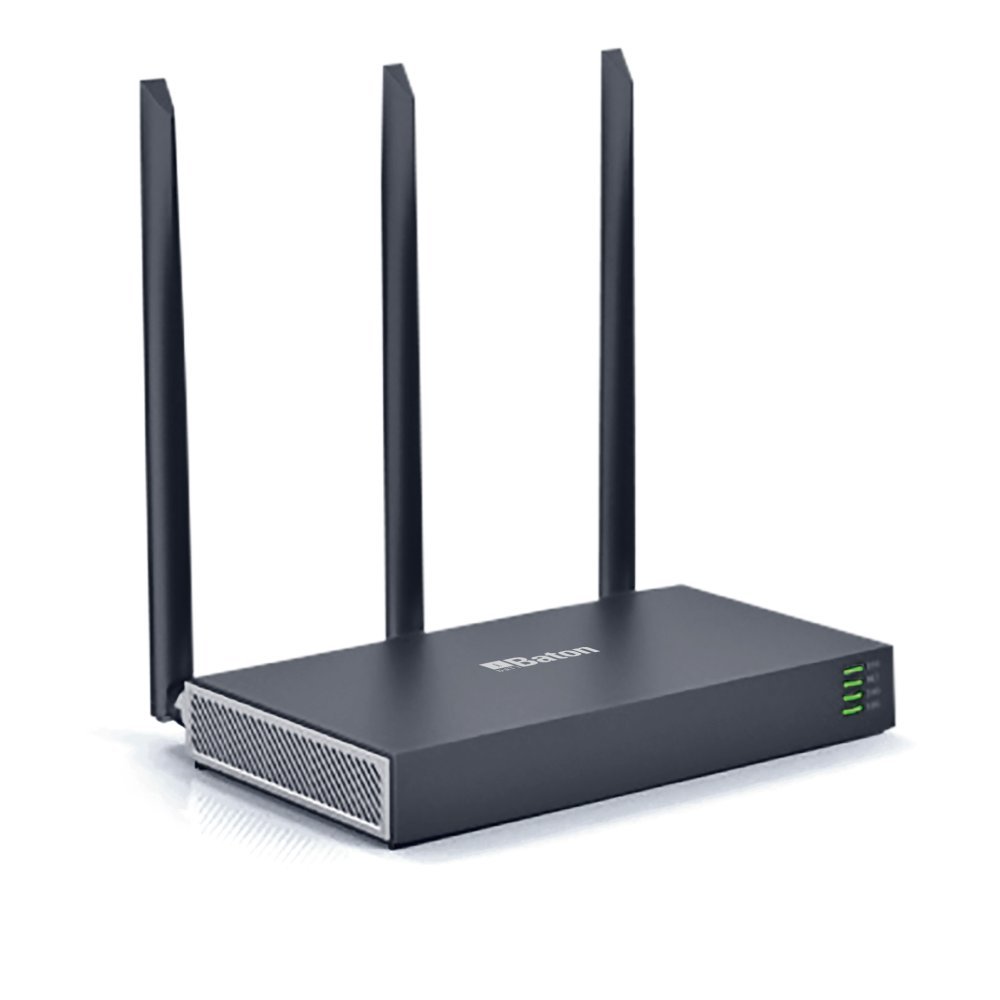
My router
My 2017 iBall Router

U-Boot 1.1.3 (Aug 25 2016 - 15:00:59)

Board: Ralink APSoC DRAM:  64 MB
relocate_code Pointer at: 83fb8000
enable ephy clock...done. rf reg 29 = 5
SSC disabled.
spi_wait_nsec: 29
spi device id: c2 20 17 c2 20 (2017c220)
find flash: MX25L6405D
raspi_read: from:30000 len:1000
*** Warning - bad CRC, using default environment

============================================
Ralink UBoot Version: 4.3.0.0
--------------------------------------------
ASIC 7620_MP (Port5<->None)
DRAM component: 512 Mbits DDR, width 16
DRAM bus: 16 bit
Total memory: 64 MBytes
Flash component: SPI Flash
WANLAN Config:WLLLL (MTC)
Date:Aug 25 2016  Time:15:00:59
============================================
icache: sets:512, ways:4, linesz:32 ,total:65536
dcache: sets:256, ways:4, linesz:32 ,total:32768

    ##### The CPU freq = 580 MHZ ####
    estimate memory size =64 Mbytes

Please choose the operation:
    1: Load system code to SDRAM via TFTP.
    2: Load system code then write to Flash via TFTP.
    3: Boot system code via Flash (default).
    4: Entr boot command line interface.
    7: Load Boot Loader code then write to Flash via Serial.
    9: Load Boot Loader code then write to Flash via TFTP.

You choosed 3
                    

Funnily since the bootdelay time was 0, it kept defaulting to boot 3 and the simple hack way to beat it was

while true; do printf "4"; done

I decided to first boot into the stock kernel to analyze a few things. To my big surprise the admin password turned out to be admin. I tried analyzing the flash layout

# cat /proc/mtd dev:
size erasesize name
mtd0: 00800000 00010000 "ALL"
mtd1: 00030000 00010000 "Bootloader"
mtd2: 00010000 00010000 "Config"
mtd3: 00010000 00010000 "Factory"
mtd4: 007a0000 00010000 "Kernel"
mtd5: 00010000 00010000 "Second_Config"
                    

At this point, I wasn’t planning a full port. I just wanted OpenWrt running. So I assumed maybe this was a white-labeled TP-Link device — it matched specs with the Archer C20 v1. So… why not just flash that image? 😄 That’s when I hit my first confusion: what’s the difference between a squashfs-sysupgrade image and a kernel image? Since ignorance can be bliss (and knowing I wouldn’t brick the bootloader), I tried TFTP-booting the sysupgrade image. That’s when I got:

Bytes transferred = 6881612 (69014c hex)
NetBootFileXferSize= 0069014c
MT7620 # bootm 0x80000000
## Booting image at 80000000 ...
Bad Magic Number,03000000
                            

This made me realize that TP-Links magic number wasn't going to work with our device even though we were loading the image at the correct address. I then found a MT7620-MT7610E Evaluation board image and it did boot, only to get stuck at a point


[ 1.760040] bridge: filtering via arp/ip/ip6tables is no longer available by default. Update your scripts to load br_netfilter if you need this.
[ 1.785873] 8021q: 802.1Q VLAN Support v1.8
[ 1.796948] /dev/root: Can't open blockdev
[ 1.805210] VFS: Cannot open root device "(null)" or unknown-block(0,0): error -6
[ 1.820121] Please append a correct "root=" boot option; here are the available partitions:
[ 1.836776] 1f00 192 mtdblock0
[ 1.836780] (driver?)
[ 1.849811] 1f01 64 mtdblock1
[ 1.849815] (driver?)
[ 1.862852] 1f02 64 mtdblock2
[ 1.862856] (driver?)
[ 1.875888] 1f03 7872 mtdblock3
[ 1.875892] (driver?)
[ 1.888922] Kernel panic - not syncing: VFS: Unable to mount root fs on unknown-block(0,0)
[ 1.905383] Rebooting in 1 seconds..
                        

Unable to mount root filesystem huh, I suspected it having issues with writing at the correct offsets. OpenWrt does not rely on a static root= parameter. Instead, it uses the mtdsplit logic to detect a squashfs image inside the firmware partition. Because the partition size or offsets were wrong, the kernel could not detect the rootfs signature leading to the panic. I then decided to say chuck it and proceeded to download the OpenWrt source for a full manual build
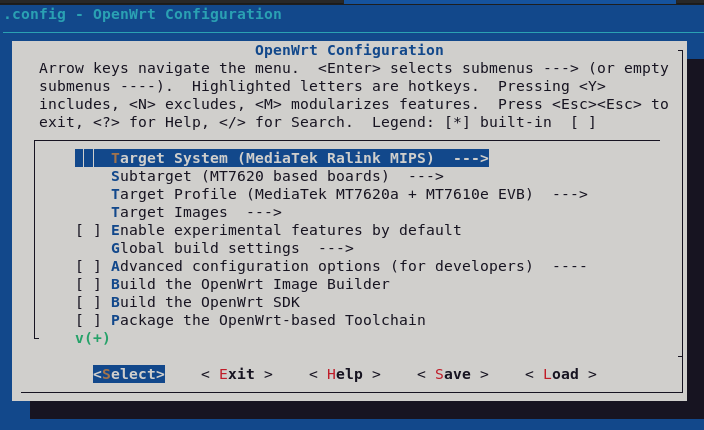
Menuconfig
Menuconfig

I used menuconfig to configure the image to the MT7620 config since I knew it could boot without giving me any bad magic number issues, I just needed to fix the mount issue now. Since the dts is supposed to handle all the stuff I proceeded to analyze them in `/target/linux/ramips/dts/`. The mt7620a_ralink_mt7610e-evb.dts seemed pretty minimal without support for any LED pin indicators on my board, I thus decided to find more dts that matched my board layout. I found the Asus RT-AC51U matched my board as well as the EVBs layout closely so I decided to try out its dts instead.

&spi0 {
	status = "okay";

	flash@0 {
		#address-cells = <1>;
		#size-cells = <1>;

		partitions {
			compatible = "fixed-partitions";
			#address-cells = <1>;
			#size-cells = <1>;

			partition@0 {
				label = "u-boot";
				reg = <0x00000000 0x00030000>;
				read-only;
			};

			partition@30000 {
				label = "u-boot-env";
				reg = <0x00030000 0x00010000>;
				read-only;
			};

			partition@40000 {
				label = "factory";
				reg = <0x00040000 0x00010000>;
				read-only;

				nvmem-layout {
					compatible = "fixed-layout";
					#address-cells = <1>;
					#size-cells = <1>;

					macaddr_factory_28: macaddr@28 {
						reg = <0x28 0x6>;
					};

					eeprom_factory_0: eeprom@0 {
						reg = <0x0 0x200>;
					};

					eeprom_factory_8000: eeprom@8000 {
						reg = <0x8000 0x200>;
					};
				};
			};

			partition@50000 {
				label = "firmware";
				reg = <0x00050000 0x007b0000>;
			};
		};
	};
                        

I modified the dts to match the addressing we previously saw in `/proc/mtd` and built the image, praying that it boots.

Starting kernel ...
[ 0.000000] Linux version 6.6.119 (advait@debian22) (mipsel-openwrt-linux-musl-gcc (OpenWrt GCC 13.3.0 r29087-d9c5716d1d) 13.3.0, GNU ld (GNU Binutils) 2.42) #0 Wed Dec 17 21:08:22 2025
[ 0.000000] Board has DDR2
[ 0.000000] Analog PMU set to hw control
[ 0.000000] Digital PMU set to hw control
[ 0.000000] SoC Type: MediaTek MT7620A ver:2 eco:6
[ 0.000000] printk: bootconsole [early0] enabled
[ 0.000000] CPU0 revision is: 00019650 (MIPS 24KEc)
[ 0.000000] MIPS: machine is Asus RT-AC51U
[ 0.000000] Initrd not found or empty - disabling initrd
[ 0.000000] Primary instruction cache 64kB, VIPT, 4-way, linesize 32 bytes.
[ 0.000000] Primary data cache 32kB, 4-way, PIPT, no aliases, linesize 32 bytes
[ 0.000000] Zone ranges:
[ 0.000000] Normal [mem 0x0000000000000000-0x0000000003ffffff]
[ 0.000000] Movable zone start for each node
[ 0.000000] Early memory node ranges
[ 0.000000] node 0: [mem 0x0000000000000000-0x0000000003ffffff]
[ 0.000000] Initmem setup node 0 [mem 0x0000000000000000-0x0000000003ffffff]
[ 0.000000] Kernel command line: console=ttyS0,57600 rootfstype=squashfs,jffs2
[ 0.000000] Dentry cache hash table entries: 8192 (order: 3, 32768 bytes, linear)
[ 0.000000] Inode-cache hash table entries: 4096 (order: 2, 16384 bytes, linear)
[ 0.000000] Writing ErrCtl register=00000001
[ 0.000000] Readback ErrCtl register=00000001
[ 0.000000] Built 1 zonelists, mobility grouping on. Total pages: 16240
[ 0.000000] mem auto-init: stack:off, heap alloc:off, heap free:off
[ 0.000000] Memory: 55100K/65536K available (6237K kernel code, 606K rwdata, 1436K rodata, 1184K init, 231K bss, 10436K reserved, 0K cma-reserved)
[ 0.000000] SLUB: HWalign=32, Order=0-3, MinObjects=0, CPUs=1, Nodes=1
[ 0.000000] NR_IRQS: 256
[ 0.000000] CPU Clock: 580MHz
[ 0.000000] clocksource: systick: mask: 0xffff max_cycles: 0xffff, max_idle_ns: 583261500 ns
[ 0.000000] systick: enable autosleep mode
[ 0.000000] systick: running - mult: 214748, shift: 32
[ 0.000000] clocksource: MIPS: mask: 0xffffffff max_cycles: 0xffffffff, max_idle_ns: 6590553264 ns
[ 0.000002] sched_clock: 32 bits at 290MHz, resolution 3ns, wraps every 7405115902ns
[ 0.015547] Calibrating delay loop... 385.84 BogoMIPS (lpj=1929216)
[ 0.087768] pid_max: default: 32768 minimum: 301
[ 0.109722] Mount-cache hash table entries: 1024 (order: 0, 4096 bytes, linear)
[ 0.124163] Mountpoint-cache hash table entries: 1024 (order: 0, 4096 bytes, linear)
[ 0.150984] RCU Tasks Trace: Setting shift to 0 and lim to 1 rcu_task_cb_adjust=1 rcu_task_cpu_ids=1.
[ 0.176364] clocksource: jiffies: mask: 0xffffffff max_cycles: 0xffffffff, max_idle_ns: 19112604462750000 ns
[ 0.195877] futex hash table entries: 256 (order: 0, 3072 bytes, linear)
[ 0.212529] pinctrl core: initialized pinctrl subsystem
[ 0.226965] NET: Registered PF_NETLINK/PF_ROUTE protocol family
[ 0.243396] /pinctrl: Fixed dependency cycle(s) with /pinctrl/pinctrl0
[ 0.528142] PCI host bridge to bus 0000:00
[ 0.536157] pci_bus 0000:00: root bus resource [mem 0x20000000-0x2fffffff]
[ 0.549884] pci_bus 0000:00: root bus resource [io 0x10160000-0x1016ffff]
[ 0.563502] pci_bus 0000:00: No busn resource found for root bus, will use [bus 00-ff]
[ 0.579308] pci 0000:00:00.0: [1814:0801] type 01 class 0x060400
[ 0.591210] pci 0000:00:00.0: reg 0x10: [mem 0x00000000-0x7fffffff]
[ 0.603659] pci 0000:00:00.0: reg 0x14: [mem 0x00000000-0x0000ffff]
[ 0.616202] pci 0000:00:00.0: supports D1
[ 0.624069] pci 0000:00:00.0: PME# supported from D0 D1 D3hot
[ 0.637501] pci 0000:00:00.0: bridge configuration invalid ([bus 00-00]), reconfiguring
[ 0.653559] pci 0000:01:00.0: [14c3:7650] type 00 class 0x028000
[ 0.665419] pci 0000:01:00.0: reg 0x10: [mem 0x00000000-0x000fffff]
[ 0.677992] pci 0000:01:00.0: PME# supported from D0 D3hot D3cold
[ 0.690464] pci 0000:01:00.1: [14c3:8650] type 00 class 0x0d1100
[ 0.702346] pci 0000:01:00.1: reg 0x10: [mem 0x00000000-0x000fffff]
[ 0.714899] pci 0000:01:00.1: supports D1
[ 0.722711] pci 0000:01:00.1: PME# supported from D0 D1 D3hot D3cold
[ 0.735645] pci_bus 0000:01: busn_res: [bus 01-ff] end is updated to 01
[ 0.748694] pci_bus 0000:00: busn_res: [bus 00-ff] end is updated to 01
[ 0.761857] pci 0000:00:00.0: BAR 0: no space for [mem size 0x80000000]
[ 0.774984] pci 0000:00:00.0: BAR 0: failed to assign [mem size 0x80000000]
[ 0.788833] pci 0000:00:00.0: BAR 8: assigned [mem 0x20000000-0x201fffff]
[ 0.802329] pci 0000:00:00.0: BAR 1: assigned [mem 0x20200000-0x2020ffff]
[ 0.815838] pci 0000:01:00.0: BAR 0: assigned [mem 0x20000000-0x200fffff]
[ 0.829334] pci 0000:01:00.1: BAR 0: assigned [mem 0x20100000-0x201fffff]
[ 0.842832] pci 0000:00:00.0: PCI bridge to [bus 01]
[ 0.852687] pci 0000:00:00.0: bridge window [mem 0x20000000-0x201fffff]
[ 0.868198] clocksource: Switched to clocksource systick
[ 0.892571] NET: Registered PF_INET protocol family
[ 0.902531] IP idents hash table entries: 2048 (order: 2, 16384 bytes, linear)
[ 0.917908] tcp_listen_portaddr_hash hash table entries: 1024 (order: 0, 4096 bytes, linear)
[ 0.934668] Table-perturb hash table entries: 65536 (order: 6, 262144 bytes, linear)
[ 0.950012] TCP established hash table entries: 1024 (order: 0, 4096 bytes, linear)
[ 0.965250] TCP bind hash table entries: 1024 (order: 1, 8192 bytes, linear)
[ 0.979287] TCP: Hash tables configured (established 1024 bind 1024)
[ 0.992804] MPTCP token hash table entries: 512 (order: 1, 6144 bytes, linear)
[ 1.007441] UDP hash table entries: 256 (order: 0, 4096 bytes, linear)
[ 1.020366] UDP-Lite hash table entries: 256 (order: 0, 4096 bytes, linear)
[ 1.035081] NET: Registered PF_UNIX/PF_LOCAL protocol family
[ 1.046369] PCI: CLS 0 bytes, default 32
[ 1.054412] rt-timer 10000100.timer: maximum frequency is 1220Hz
[ 1.074063] workingset: timestamp_bits=14 max_order=14 bucket_order=0
[ 1.088758] squashfs: version 4.0 (2009/01/31) Phillip Lougher
[ 1.100279] jffs2: version 2.2 (NAND) (SUMMARY) (LZMA) (RTIME) (CMODE_PRIORITY) (c) 2001-2006 Red Hat, Inc.
[ 1.126357] Serial: 8250/16550 driver, 2 ports, IRQ sharing disabled
[ 1.140924] printk: console [ttyS0] disabled
[ 1.149991] 10000c00.uartlite: ttyS0 at MMIO 0x10000c00 (irq = 20, base_baud = 2500000) is a Palmchip BK-3103
[ 1.169722] printk: console [ttyS0] enabled
[ 1.169722] printk: console [ttyS0] enabled
[ 1.186238] printk: bootconsole [early0] disabled
[ 1.186238] printk: bootconsole [early0] disabled
[ 1.225193] spi spi0.0: force spi mode3
[ 1.233535] spi-nor spi0.0: mx25l6405d (8192 Kbytes)
[ 1.243628] 4 fixed-partitions partitions found on MTD device spi0.0
[ 1.256683] Creating 4 MTD partitions on "spi0.0":
[ 1.266282] 0x000000000000-0x000000030000 : "u-boot"
[ 1.280436] 0x000000030000-0x000000040000 : "u-boot-env"
[ 1.293879] 0x000000040000-0x000000050000 : "factory"
[ 1.307193] 0x000000050000-0x000000800000 : "firmware"
[ 1.320744] 2 uimage-fw partitions found on MTD device firmware
[ 1.332642] Creating 2 MTD partitions on "firmware":
[ 1.342551] 0x000000000000-0x00000027f585 : "kernel"
[ 1.352453] mtd: partition "kernel" doesn't end on an erase/write block -- force read-only
[ 1.371620] 0x00000027f585-0x0000007b0000 : "rootfs"
[ 1.381615] mtd: partition "rootfs" doesn't start on an erase/write block boundary -- force read-only
[ 1.402496] mtd: setting mtd5 (rootfs) as root device
[ 1.412747] 1 squashfs-split partitions found on MTD device rootfs
[ 1.425089] 0x0000005f0000-0x0000007b0000 : "rootfs_data"
[ 1.471913] gsw: setting port4 to ephy mode
[ 1.480569] mtk_soc_eth 10100000.ethernet: mdio-bus disabled
[ 1.492189] mtk_soc_eth 10100000.ethernet: loaded mt7620 driver
[ 1.504901] mtk_soc_eth 10100000.ethernet eth0: mediatek frame engine at 0xb0100000, irq 5
[ 1.522139] rt2880_wdt 10000120.watchdog: Initialized
[ 1.534711] NET: Registered PF_INET6 protocol family
[ 1.552689] Segment Routing with IPv6
[ 1.560279] In-situ OAM (IOAM) with IPv6
[ 1.568350] NET: Registered PF_PACKET protocol family
[ 1.578505] 8021q: 802.1Q VLAN Support v1.8
[ 1.632668] clk: Disabling unused clocks
[ 1.649630] VFS: Mounted root (squashfs filesystem) readonly on device 31:5.
[ 1.670245] Freeing unused kernel image (initmem) memory: 1184K
[ 1.682084] This architecture does not have kernel memory protection.
[ 1.694934] Run /sbin/init as init process
[ 2.523265] init: Console is alive
[ 2.530654] init: - watchdog -
[ 4.016039] kmodloader: loading kernel modules from /etc/modules-boot.d/*
[ 4.114068] usbcore: registered new interface driver usbfs
[ 4.125198] usbcore: registered new interface driver hub
[ 4.136032] usbcore: registered new device driver usb
[ 4.150972] gpio_button_hotplug: loading out-of-tree module taints kernel.
[ 4.190800] phy phy-usbphy.0: remote usb device wakeup disabled
[ 4.202644] phy phy-usbphy.0: UTMI 16bit 30MHz
[ 4.211509] ehci-platform 101c0000.ehci: EHCI Host Controller
[ 4.222998] ehci-platform 101c0000.ehci: new USB bus registered, assigned bus number 1
[ 4.238971] ehci-platform 101c0000.ehci: irq 26, io mem 0x101c0000
[ 4.261221] ehci-platform 101c0000.ehci: USB 2.0 started, EHCI 1.00
[ 4.275232] hub 1-0:1.0: USB hub found
[ 4.284001] hub 1-0:1.0: 1 port detected
[ 4.304672] ohci-platform 101c1000.ohci: Generic Platform OHCI controller
[ 4.318344] ohci-platform 101c1000.ohci: new USB bus registered, assigned bus number 2
[ 4.334372] ohci-platform 101c1000.ohci: irq 26, io mem 0x101c1000
[ 4.374955] hub 2-0:1.0: USB hub found
[ 4.383732] hub 2-0:1.0: 1 port detected
[ 4.403074] kmodloader: done loading kernel modules from /etc/modules-boot.d/*
[ 4.422316] init: - preinit -
[ 4.583855] mtk_soc_eth 10100000.ethernet eth0: port 1 link up (100Mbps/Full duplex)
[ 8.443516] random: crng init done
[ 9.610555] 8021q: adding VLAN 0 to HW filter on device eth0
Press the [f] key and hit [enter] to enter failsafe mode
Press the [1], [2], [3] or [4] key and hit [enter] to select the debug level
[ 11.306668] mount_root: jffs2 not ready yet, using temporary tmpfs overlay
[ 11.325738] urandom-seed: Seed file not found (/etc/urandom.seed)
[ 11.431419] procd: - early -
[ 11.437668] procd: - watchdog -
[ 11.938363] procd: - watchdog -
[ 11.945893] procd: - ubus -
[ 12.090646] procd: - init -
Please press Enter to activate this console.
[ 13.627735] kmodloader: loading kernel modules from /etc/modules.d/*
[ 15.472581] Loading modules backported from Linux version v6.12.61-0-gdcbeffaf66d0
[ 15.487766] Backport generated by backports.git v6.1.110-1-35-g410656ef
[ 16.247392] PPP generic driver version 2.4.2
[ 16.269932] NET: Registered PF_PPPOX protocol family
[ 16.339662] mt76x0e 0000:01:00.0: card - bus=0x1, slot = 0x0 irq=4
[ 16.352368] mt76x0e 0000:01:00.0: ASIC revision: 76100002
[ 16.428224] mt76x0e 0000:01:00.0: Firmware Version: 0.1.00
[ 16.727318] mt76x0e 0000:01:00.0: EEPROM ver:02 fae:00
[ 16.738261] mt76x0e 0000:01:00.0: registering led 'mt76-phy0'
[ 16.889126] ieee80211 phy1: rt2x00_set_rt: Info - RT chipset 6352, rev 0500 detected
[ 16.905052] ieee80211 phy1: rt2x00_set_rf: Info - RF chipset 7620 detected
[ 17.026964] kmodloader: done loading kernel modules from /etc/modules.d/*
login[763]: root login on 'ttyS0'
BusyBox v1.36.1 (2025-12-17 21:08:22 UTC) built-in shell (ash)
_______ ________ __
| |.-----.-----.-----.| | | |.----.| |_
| - || _ | -__| || | | || _|| _|
|_______|| __|_____|__|__||________||__| |____|
|__| W I R E L E S S F R E E D O M
-----------------------------------------------------
OpenWrt 24.10.5, r29087-d9c5716d1d
-----------------------------------------------------
=== WARNING! =====================================
There is no root password defined on this device!
Use the "passwd" command to set up a new password
in order to prevent unauthorized SSH logins.
--------------------------------------------------
root@(none):~# cat /proc/cpuinfo
system type : MediaTek MT7620A ver:2 eco:6
machine : Asus RT-AC51U
processor : 0
cpu model : MIPS 24KEc V5.0
BogoMIPS : 385.84
wait instruction : yes
microsecond timers : yes
tlb_entries : 32
extra interrupt vector : yes
hardware watchpoint : yes, count: 4, address/irw mask: [0x0ffc, 0x0ffc, 0x0ffb, 0x0ffb]
isa : mips1 mips2 mips32r1 mips32r2
ASEs implemented : mips16 dsp
Options implemented : tlb 4kex 4k_cache prefetch mcheck ejtag llsc pindexed_dcache userlocal vint perf_cntr_intr_bit perf mm_full
shadow register sets : 1
kscratch registers : 0
package : 0
core : 0
VCED exceptions : not available
VCEI exceptions : not available
                    

And it did boot! The kernel came up cleanly:

  • MT7620A detected
  • SPI NOR detected correctly
  • Firmware split into kernel + rootfs
  • rootfs_data created
  • Ethernet working
  • Both wireless radios initialized (mt76 drivers)
  • OpenWrt 24.10.5 booted successfully

What started as “maybe I can just flash a TP-Link image” turned into:

  • UART debugging
  • Partition reverse engineering
  • DTS surgery
  • Custom OpenWrt build
I’ll tweak things a bit more, clean up the DTS, and maybe just maybe we can upstream the world’s only OpenWrt-supported iBall router build 😄